Role : Lead Product Designer · Team : 2 PM, 1 Engineer, 1 QA · Timeline : 4 weeks · Platform : Mobile (Web)

How I turned a -15% user drop into a +25% conversion uplift

Shipped to 8+ consumer brands simultaneously. Zero per-brand layout changes.

One product, 8+ consumer brands. Every design decision I made shipped simultaneously to millions of users, with no ability to customise per brand. That constraint shaped every call.

MY ROLE

Every design decision on this project was mine — what to test, what to reject, what to push back on, what to ship. The PM owned prioritisation. Engineering owned implementation. This was the highest-traffic conversion surface in the product.

WHO'S USING THIS?

A mobile user in a short session she treats as entertainment. Deciding fast, often distracted, on a small screen. The surface had one job: surface the right information before she moved on.

THE PROBLEM

The brief said visual. The data said something else.

A −15% DAU drop was flagged as a design problem. Before opening Figma, I mapped session drop-off with the PM and Head of Product to confirm whether friction was in the lobby or upstream.

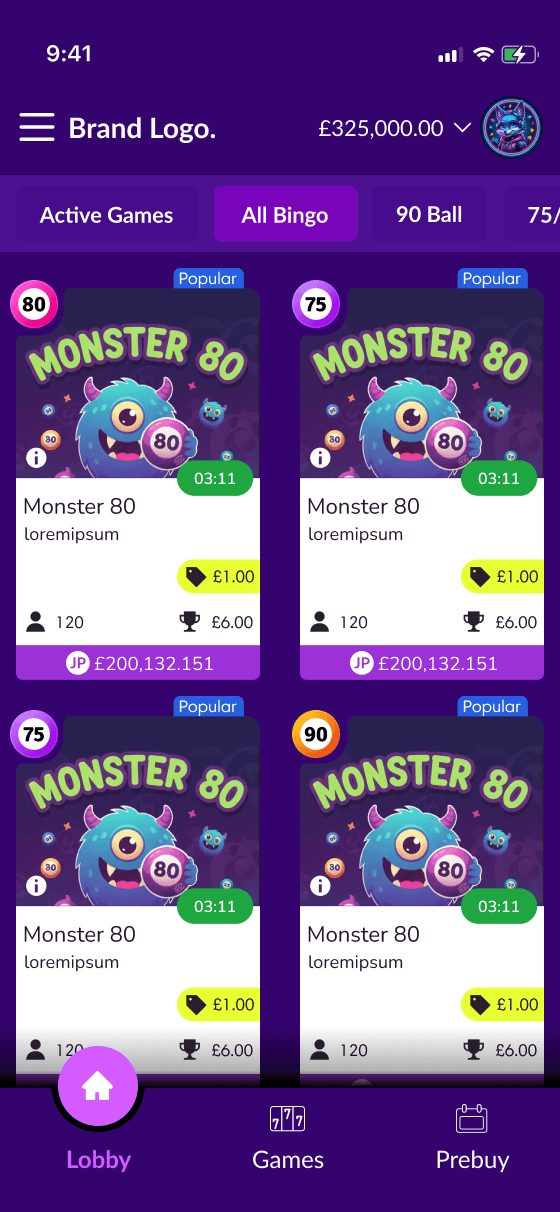
The lobby wasn't failing visually. It was failing informationally. Price, urgency, and availability were buried — no hierarchy, no urgency signalling, every listing visually equal. Users couldn't extract what they needed fast enough to act.
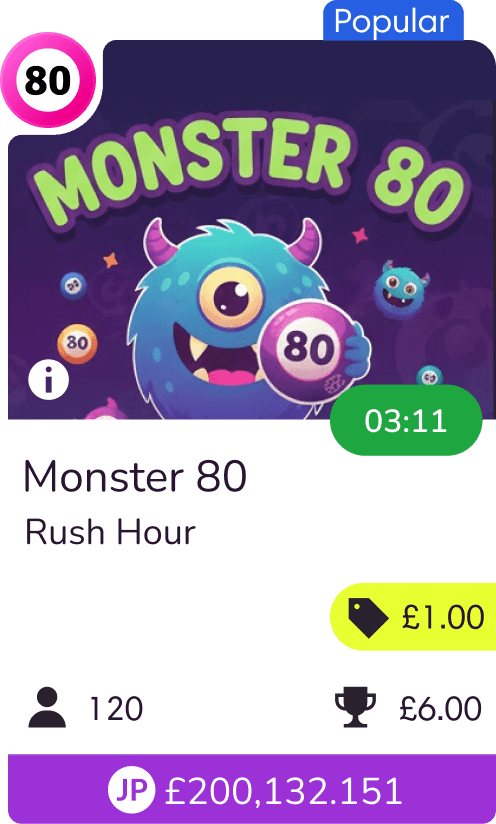
Scattered decision signals

No priority hierarchy

Low Conversion Rate

(11.5%)

Weather app image
Weather app image
Weather app image

THE INSIGHT

We were violating a scanning pattern we already knew about.

F-pattern scanning: attention lands heaviest top-left and drops off fast. Our cards placed every decision-critical signal — price, urgency, availability — centre and right. Exactly where attention dies.

The fix wasn't more information. It was moving the right information to where eyes already land.

P1

Countdown Timer

creates immediate urgency

(Urgency/Cost)

P2

Ticket Price

captured early in the scan

(Cost)

P3

Jackpot

primary financial motivator

(Incentive)
THE TIMER FIGHT

Engineering pushed back on the three-state colour system — updating a number is simpler to build than a colour shift. I made the case with operator feedback we already had: users were missing the timer. They'd scroll past a game about to fill without registering it was urgent.

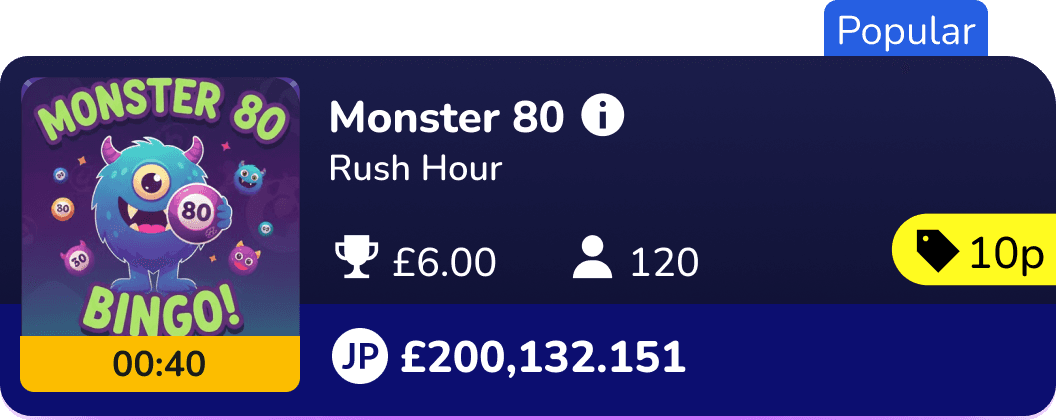
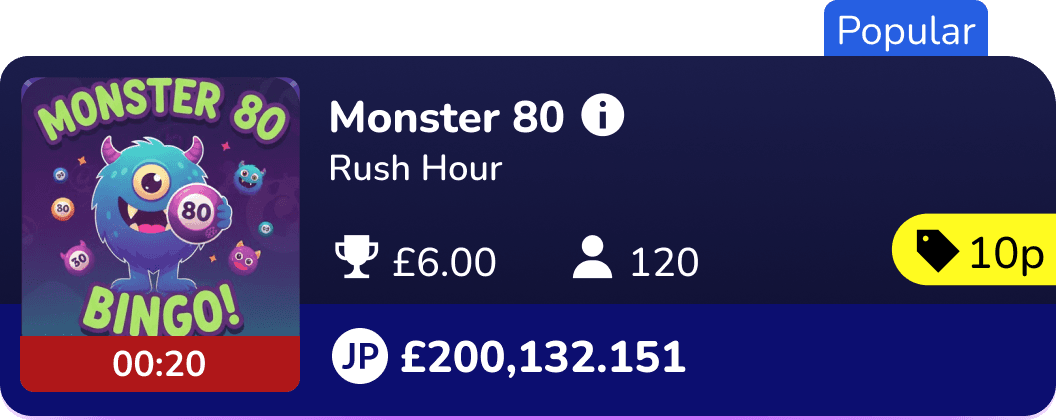
Green → yellow → red gave the timer a second communication channel beyond the number. Users didn't need to read "0:12" to know a game was urgent. The colour told them first. Small interaction. No overwhelm. We kept it.

Green > Yellow > Red

Accessibility - Timer States

7.90:1 - AAA

7.90:1 - AAA

10.29:1 - AAA

Red #AF1719 + #FFFFF text

Yellow #FCBD00 + #000000 text

Green #00B82E + #000000 text

Weather app image

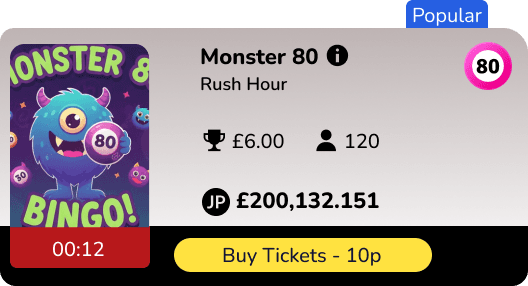
No buy button on the tile - All card space preserved for decision critical information

Full card is the tap target - 44px minimum touch target, no precision required

Purchase happens inside the detail view, not on the listing tile - adding a buy button to the card would have duplicated this step

EXPLORATION

Three concepts. Each tested a different hypothesis.

Concept A

Rejected

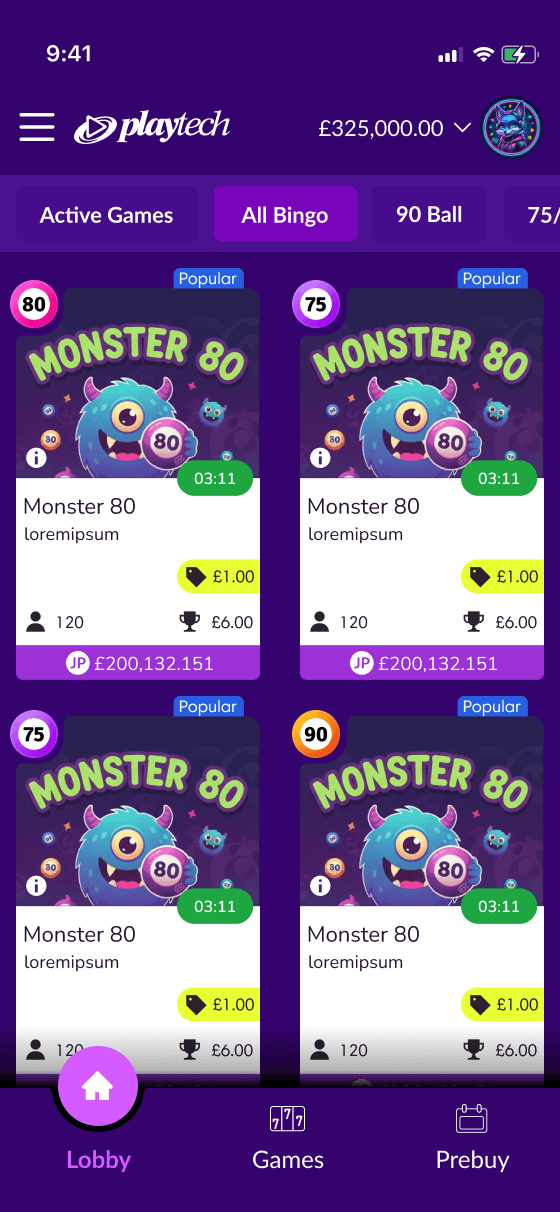
AI-assisted exploration, tested against our existing user data. Structurally too long — not enough games visible above the fold. Scrolling to decide is a conversion killer for this user. This is the moment we committed to a horizontal tile: the only format that surfaces enough options while maintaining a clean left-to-right scan.

Vertical card

Structurally almost identical to what we shipped. One PM pushed for an explicit buy button. I pushed back: tapping a listing already opens a purchase overlay inside the game room — a progressive disclosure pattern that reduces purchase anxiety. A tile-level button duplicates the action and consumes the space we needed for urgency signals. We removed it. Testing tap-to-enter with real users is the V2 research priority.

Concept B

Rejected

Horizontal tile + buy button

Rejected

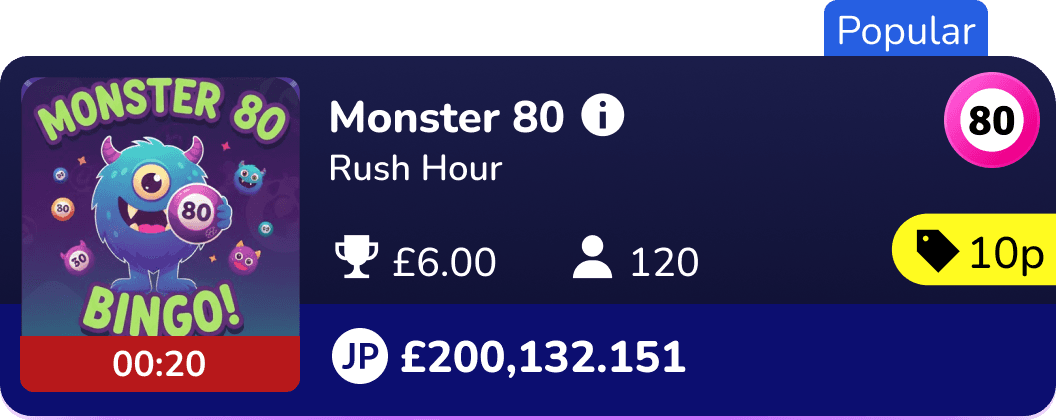
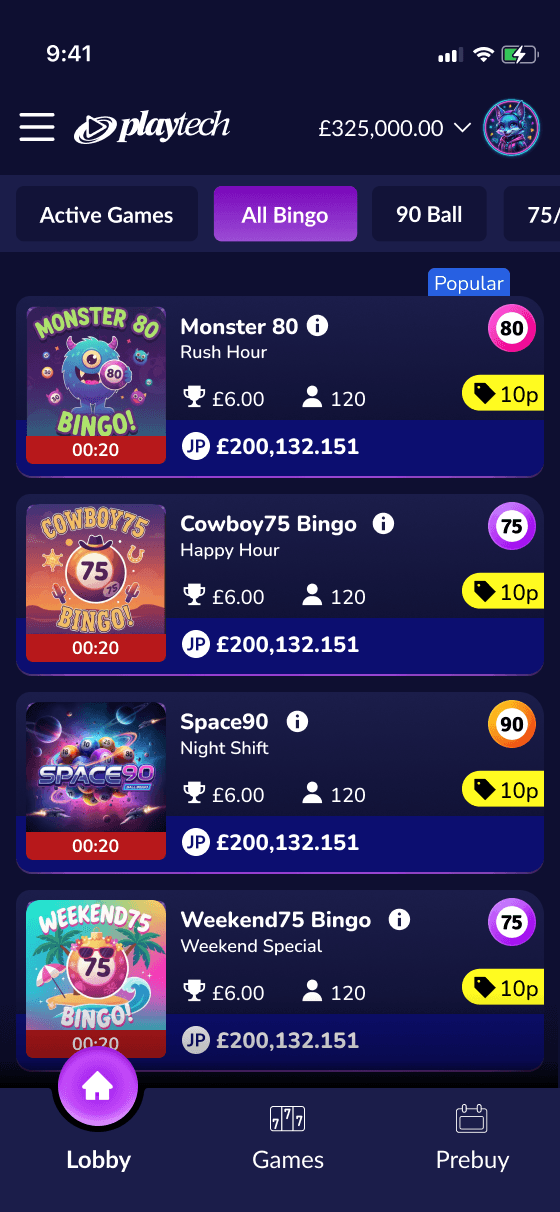
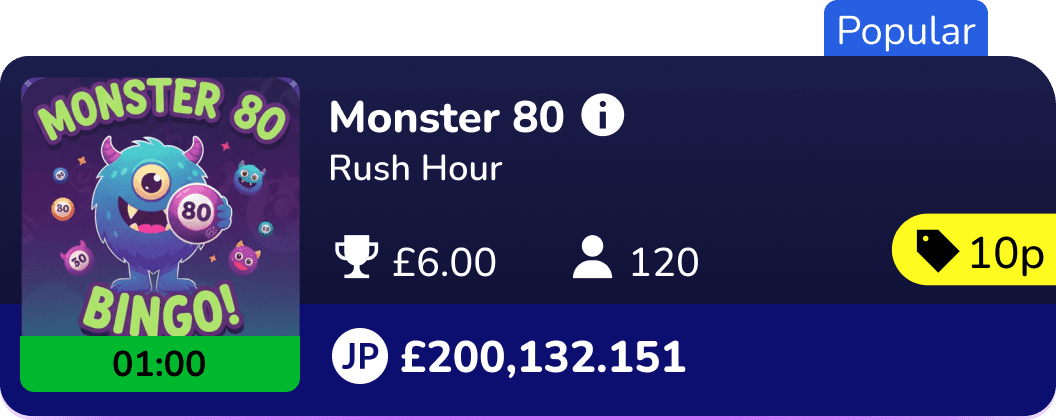
Concept C went through three rounds of layout iteration before the F-pattern hierarchy was locked. Decision signals anchored top-left in priority order: countdown timer (urgency), ticket price (cost), jackpot (incentive). Deployable across all consumer brands without touching the layout.

Concept C

Horizontal tile + with improved layout

Selected

THE TIMER FIGHT

Engineering pushed back on the three-state colour system — updating a number is simpler to build than a colour shift. I made the case with operator feedback we already had: users were missing the timer. They'd scroll past a listing about to close without registering it was urgent.

Green → yellow → red gave the timer a second communication channel beyond the number. Users didn't need to read "0:12" to know a game was urgent. The colour told them first. Small interaction. No overwhelm. We kept it.

Green > Yellow > Red

Accessibility - Timer States

All states use color + text label - never color alone. Contrast ratios verified against WCAG

Green #00B82E + #000000 text

Yellow #FCBD00 + #000000 text

Yellow #FCBD00 + #000000 text

Red #AF1719 + #FFFFFF text

10.29:1 - AAA

10.29:1 - AAA

7.90:1 - AAA

7.90:1 - AAA

No buy button on the tile - All card space preserved for decision critical information

Full card is the tap target - 44px minimum touch target, no precision required

Purchase happens inside the detail view, not on the listing tile. - adding a buy button to the card would have duplicated this step

Weather app image

AI VALIDATION - ATTENTION INSIGHT ANALYSIS

Validating the hypothesis before a line of code was written

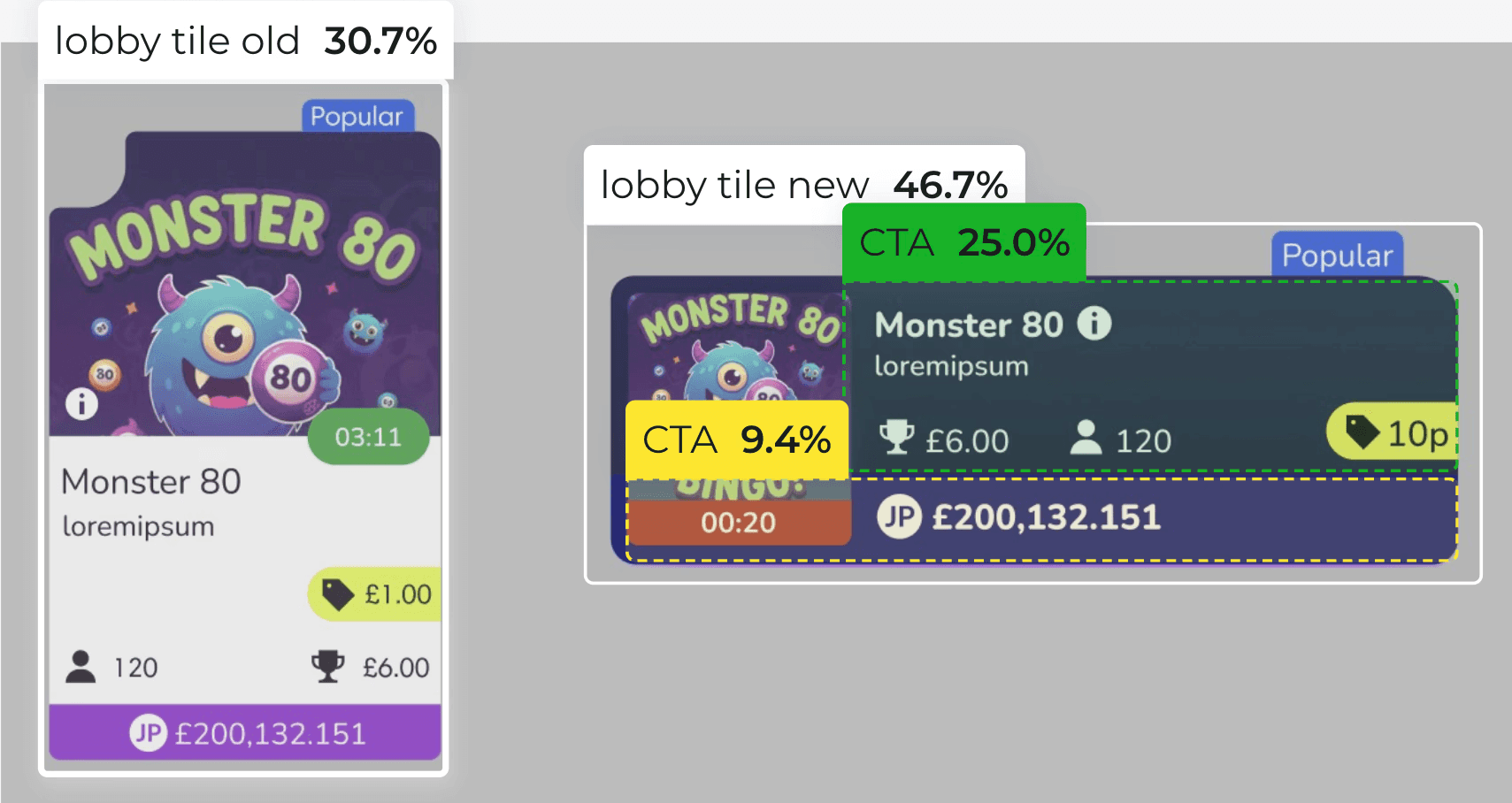
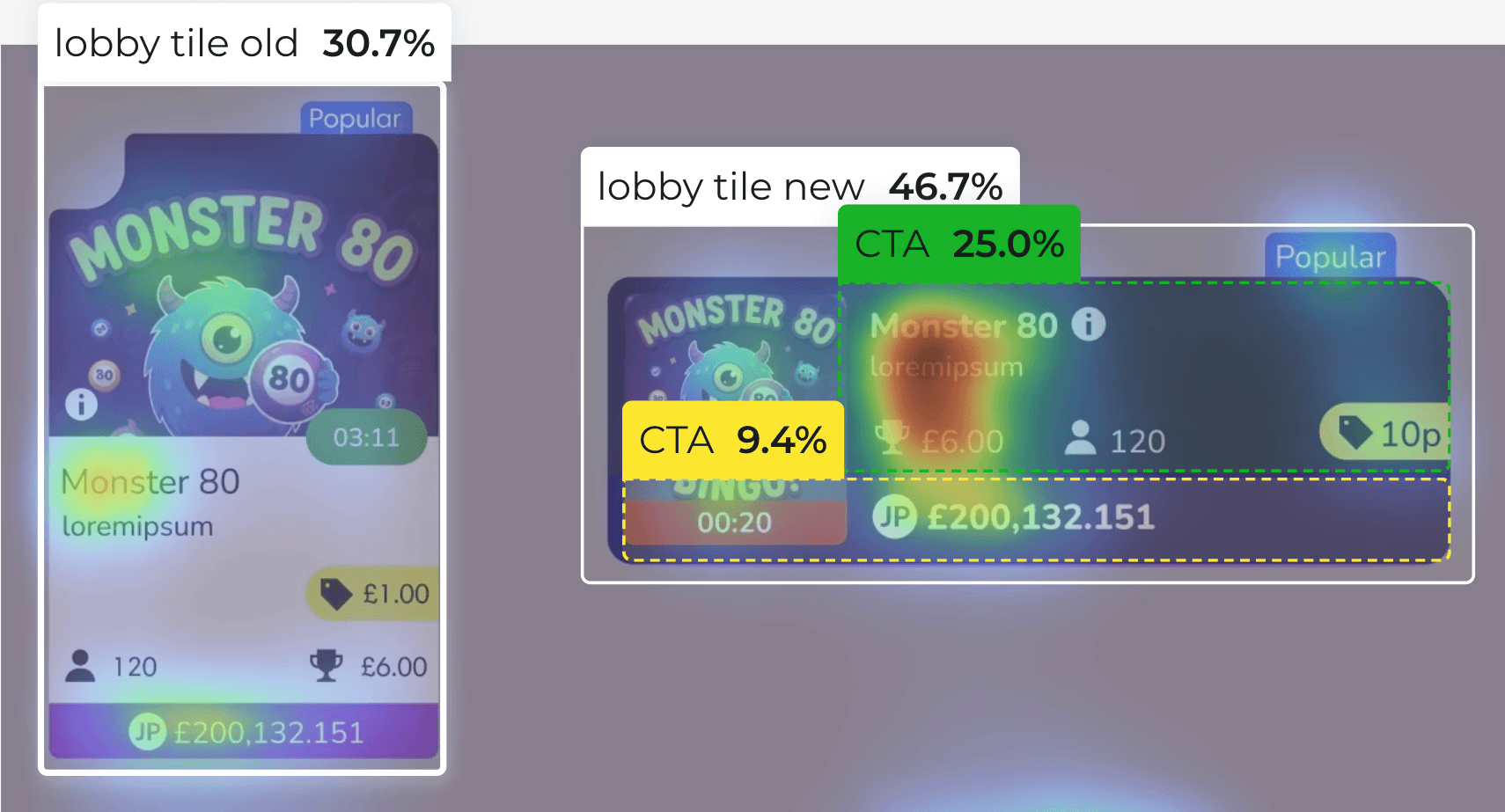
Before engineering began, I used Attention Insight to generate predictive heatmaps of both versions — a pre-build directional check, not a substitute for user research. The prediction held. Post-launch operator data confirmed the same direction: moving decision signals to where attention naturally lands changed how users acted on the listing surface.

I used Attention Insight to generate AI predicted heatmaps of both versions validating the hypothesis with data, not design instinct.

CTA Score

9.4% → 25.0%

Clarity Score

30.7% → 46.7%

CTA Score

Clarity Score

9.4% → 25.0%

30.7% → 46.7%

THE FINAL DESIGN

Key annotation callouts:

Weather app image
Weather app image
Weather app image

Top-left anchor

countdown timer creates urgency before user reads anything else

Price immediately below

cost captured in the first vertical scan

Jackpot right-aligned

incentive visible without dominating

Card tap = enter room

no buy button; progressive disclosure reduces purchase anxiety

Weather app image

Top-left anchor

countdown timer creates urgency before user reads anything else

Price immediately below

cost captured in the first vertical scan

Jackpot right-aligned

incentive visible without dominating

Card tap = enter room

no buy button; progressive disclosure reduces purchase anxiety

Weather app image
Weather app image

Top-left anchor

countdown timer creates urgency before user reads anything else

Jackpot right-aligned

incentive visible without dominating

Price immediately below

cost captured in the first vertical scan

Card tap = enter room

no buy button; progressive disclosure reduces purchase anxiety

ACCESSIBILITY

  • Minimum touch target 44×44px across all interactive elements

  • Countdown timer uses colour + text label never colour alone

  • Urgency states tested at 4.5:1 contrast ratio minimum

  • Timer state communicated via aria-live for screen readers handling time-sensitive content

A DELIBERATE TRADE OFF

We chose not to add a buy button and documented why.

Tapping a listing opens a purchase overlay inside the session. Users preview the live room before committing progressive disclosure that lowers purchase anxiety. A tile-level buy button would have duplicated that step and consumed space we needed for urgency signals.

This was a reasoned hypothesis, not a closed decision. Testing the buy action with real users across operator contexts is the V2 research priority.

SCALE

Built once. Shipped across 8+ consumer brands without a single layout change.

Per brand: colours and room imagery updated. Layout, hierarchy, interaction states, accessibility spec — untouched.

This wasn't just a UX improvement. It compressed design-to-operator delivery time and removed the quality variance that comes from building each brand separately.

IMPACT

Every key metric moved in the right direction

25%

Conversion Uplift

0


Layout redesigns

8+

Consumer brands launched

The AI-predicted CTA improvement of +166% was confirmed directionally by post-launch operator data. The magnitude varied by operator context — the direction was consistent across all of them.

SCALE

Built once. Shipped across 8+ consumer brands without a single layout change.

Per brand: colours and room imagery updated. Layout, hierarchy, interaction states, accessibility spec — untouched.

This wasn't just a UX improvement. It compressed design-to-operator delivery time and removed the quality variance that comes from building each brand separately.

Weather app image
Weather app image
Weather app image

A component that doesn't require redesign per brand is a commercial asset

IMPACT

Every key metric moved in the right direction

25%

Conversion uplift

8+

Consumer brands launched

0

Layout redesigns per operator

The AI-predicted CTA improvement of +166% was confirmed directionally by post-launch operator data. The magnitude varied by operator context — the direction was consistent across all of them.

REFLECTIONS

What I'd do differently, and what comes next

Test tap-to-enter earlier. The progressive disclosure decision was grounded in established UX convention, not usability evidence from this specific audience. A 20-person moderated session pre-launch would have confirmed the assumption or caught an edge case before ship.

Instrument card states individually. We measured conversion at the surface level. We didn't know which state — filling fast, full, starting soon — was driving or blocking conversion at the card level. That granularity would have made V2 decisions significantly sharper.

Get in touch

jain.tanisha23@gmail.com

All rights reserved, ©2026

Get in touch

jain.tanisha23@gmail.com

All rights reserved, ©2026

Get in touch

jain.tanisha23@gmail.com

All rights reserved, ©2026